


20
If connection is successful the following information will appear
beside the parameters.
If no connection can be established then you will have the
following information beside the parameters:
Search Auto… button
Search Auto… button will inspect your Device manager to find out the
corresponding COM port and apply default speed.
If connection is successful the following information will appear
beside the parameters.
If no connection can be established then you will have the
following information beside the parameters:
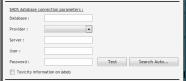
SMDS / SpaceTrax database connection __________________________
If somewhere on your network (or on your desktop) there is an SMDS / SpaceTrax
application and its SMDS / SpaceTrax database, Ideal-RFID software can make
queries on it (reading only) to collect information about product to which RFID tag is
referring.
If you don't have access to an SMDS / SpaceTrax database, Ideal-RFID will give you
the information that the RFID tag is readable or not.
Database
Specify the name of the SMDS database
Provider
Select in the dropdown listbox a provider for the connection.
You can choose between 2 providers:
•
MSSQL (SQL Server database)
•
ORACLE
Server
Specify the name of the server where the SMDS / SpaceTrax database is placed.
User
Specify the user to connect to SMDS / SpaceTrax database