

19
Trace ____________________________________________________________
You can switch the trace ON / OFF.
When the trace is ON, Ideal-RFID software will store the ID of the RFID tags which
have been read and if SMDS / SpaceTrax database connection is active it will also
store the information about the product linked to this ID.
Trace is ON
You can type directly the path and the name of Trace file in the editing area.
You can use the button
to select the folder to store data.
The data are stored in a text file (.log) in the path you provided.
Trace is OFF
Editing area is grayed and the folder selection button is inactive
Default value for Trace functionality is OFF
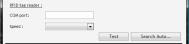
RFID tag reader __________________________________________________
COM port
Specify a COM port number
Speed
Select a COM speed in the dropdown listbox.
You can choose between 5 speeds:
•
9 600
•
19 200
•
38 400
•
57 600
•
115 200
Note: Default value is 115 200
Test button
The Test button try to establish connection to USB RFID reader with the parameters
provided.